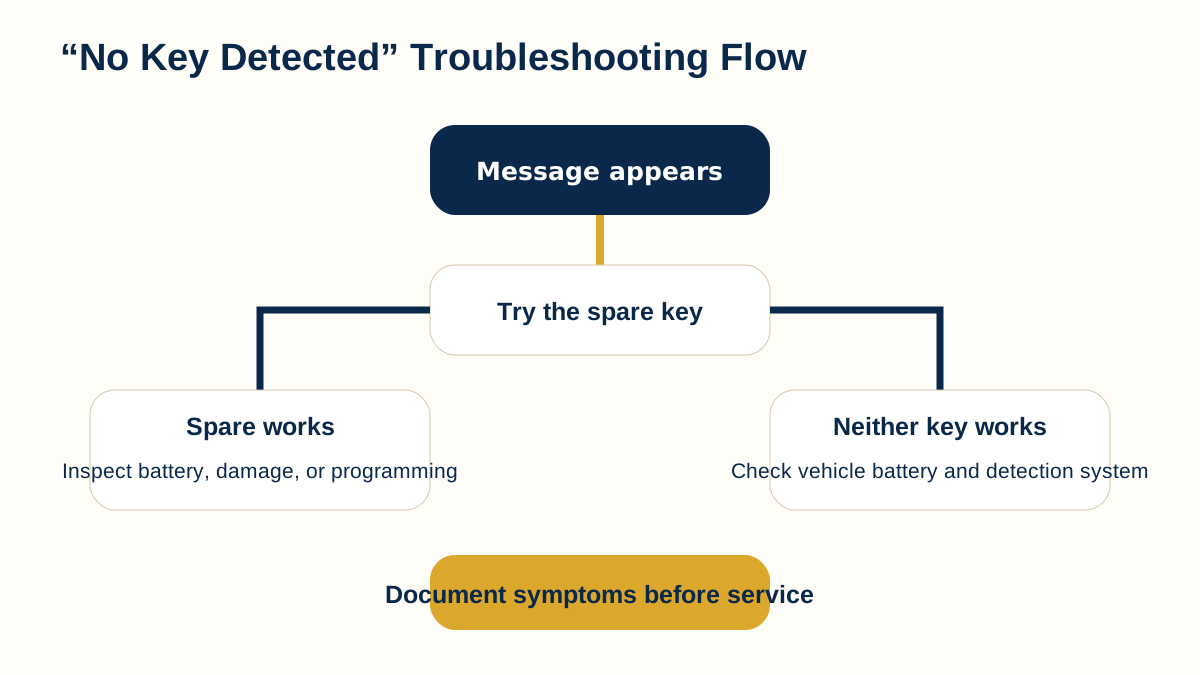
Use a safe, high-level troubleshooting flow for a “No Key Detected” message, including key-fob battery checks, spare-key comparison, interference, vehicle battery condition, and backup recognition.
Educational visual created for AutoLocksmith.LLC. Vehicle systems vary by manufacturer, model, year, and equipment.
Overview
A “No Key Detected” message means the vehicle did not successfully recognize an expected key during that moment. It does not automatically mean the key is permanently bad. The message can be caused by a weak fob battery, damaged key electronics, radio interference, a vehicle-side detection problem, a weak vehicle battery, or simply the key being outside the expected detection area. A careful, non-invasive troubleshooting sequence can help determine what to check next.
Start with the exact symptom
Note when the message appears. Does the vehicle fail to unlock passively, fail to start, or both? Do remote buttons still work? Does the message appear every time or only in certain locations?
The more specific the symptom, the easier it is to distinguish a fob-battery issue from a broader smart-key or vehicle problem.
Try the spare key if one exists
A known-good spare is one of the most useful diagnostic comparisons. If the spare works normally in the same place and under the same conditions, the original fob becomes more suspect. If both keys fail in the same way, a vehicle-side condition, interference, or vehicle-battery issue becomes more plausible.
Do not repeatedly erase or reprogram keys as a first troubleshooting step.
Check the key-fob battery
If the battery is user-replaceable, use the correct battery type and orientation. Inspect the contacts for obvious damage and make sure the case closes properly. A weak battery often produces reduced range or intermittent recognition before total failure.
Changing the battery does not reprogram the key. However, rough handling during battery replacement can damage contacts or the circuit board, so care matters.
Move away from possible interference
Strong radio-frequency activity, certain electronic devices, metallic enclosures, or unusual environmental conditions can affect wireless communication. If the problem occurs only in one location, moving the vehicle or key a reasonable distance away may provide a useful comparison.
Interference is only one possibility; it should not be assumed without evidence.
Check the vehicle battery condition
Smart-key modules, antennas, locks, and starting systems depend on the vehicle’s electrical system. A weak 12-volt battery can create confusing electronic symptoms even when the key is healthy.
If interior lighting, locks, displays, or starting behavior also seem abnormal, the vehicle battery and power supply deserve attention.
Use the manufacturer backup recognition method
Many smart-key vehicles provide a method for recognizing the key at close range when the fob battery is weak. This may involve holding the key at a specific point or using an emergency mechanical key for access. The correct procedure is vehicle-specific and should be taken from the owner’s manual.
If backup recognition works while normal proximity detection does not, that difference is useful diagnostic information.
When the key may need professional evaluation
Physical damage, water exposure, a broken case, repeated battery-contact problems, or a failure limited to one key can justify professional evaluation. Compatibility and programming status may also need to be confirmed if the key is a replacement or was recently purchased.
A professional can help determine whether the issue is the key, programming, or a vehicle-side component without relying on guesswork.
What not to do
Do not buy multiple replacement fobs based only on appearance. Do not follow instructions intended to bypass or defeat vehicle security. Do not assume every “No Key Detected” message has the same cause.
Safe troubleshooting is about comparing symptoms and confirming compatibility, not defeating authorization controls.
A practical final check
Before arranging service, make one final record of what changed and what did not. Note whether the vehicle responds to lock or unlock commands, whether the dashboard powers up normally, whether the spare key behaves differently, and whether a battery change affected the result. This short checklist gives the next person working on the problem a cleaner starting point and helps prevent the same basic checks from being repeated unnecessarily.
Reading the flowchart safely
The flowchart should be used as a sequence of comparisons rather than as a promise that one symptom has one cause. Start with the easiest non-invasive checks, compare a spare key when available, and observe whether the problem changes after a correct battery replacement or in a different location. Each result narrows possibilities without disturbing the vehicle’s security configuration.
Stop the do-it-yourself process if the key is physically damaged, the vehicle battery appears unstable, the car cannot be secured safely, or the owner’s manual directs the driver to professional service. The purpose of the chart is to organize information, not to encourage repeated programming attempts or security-system experimentation.
Information to give a locksmith or repair professional
Describe the exact dashboard message, whether the remote buttons work, whether passive entry works, whether the vehicle starts with the spare key, and whether the problem occurs everywhere or only at one location. Include the vehicle year, make, model, and trim when known.
Also mention recent events such as a fob battery change, a dead vehicle battery, water exposure, impact damage, or the purchase of a replacement key. A clear timeline can be more useful than simply saying that the key stopped working.
Key takeaways
A “No Key Detected” message is a symptom, not a diagnosis.
A spare key comparison can quickly narrow the possibilities.
Key-fob and vehicle-battery condition both matter.
Use manufacturer-specific backup procedures instead of improvised security workarounds.
Continue learning
Use these related AutoLocksmith.LLC resources to continue from the visual into broader driver education and technical background.
Professional automotive key help when you need it.
AutoLocksmith.LLC provides education and referral guidance. For supported mobile automotive key and vehicle-security services, contact Wood's Automotive Locksmith.
When you call, mention that you found the service through KEYRING to receive $10.00 off your bill