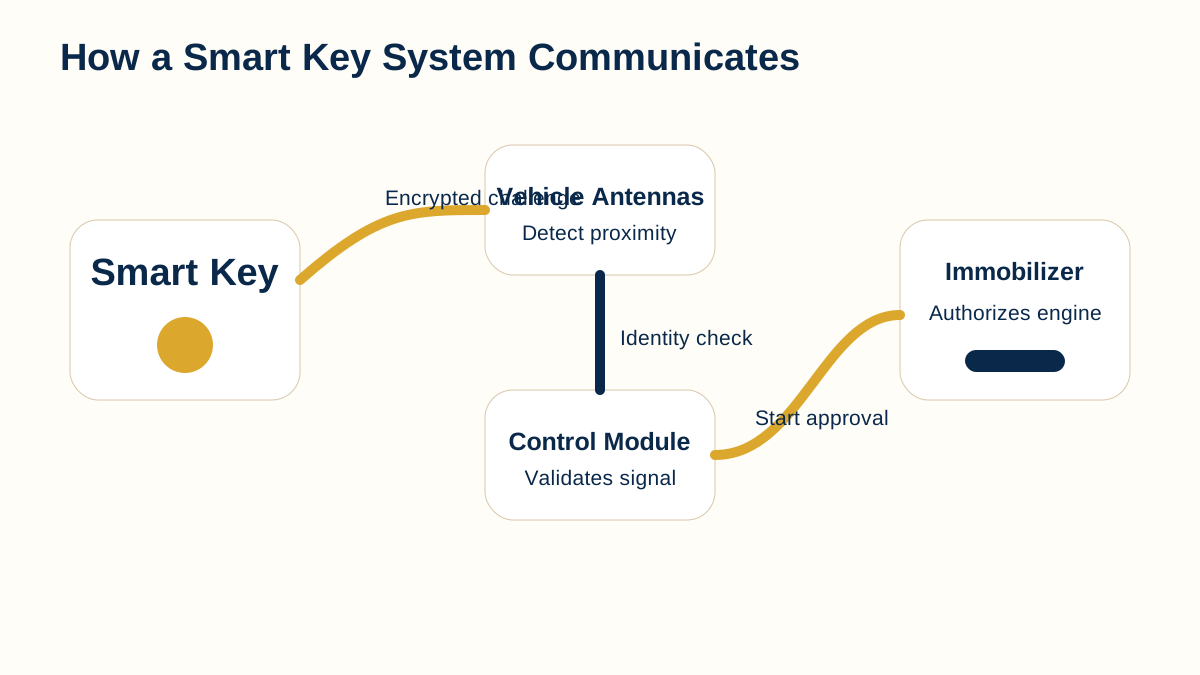
Explore an interactive, simplified smart-key communication sequence showing key detection, vehicle validation, and start authorization without exposing security-bypass procedures.
Educational visual created for AutoLocksmith.LLC. Vehicle systems vary by manufacturer, model, year, and equipment.
Overview
Smart-key operation can feel instantaneous to the driver, but several events must happen in the background. The vehicle needs to request or detect a key, receive a valid response, decide whether the credential is authorized, and permit the requested function. The interactive sequence below simplifies that process into three educational stages. It is intentionally high level because real security protocols vary by manufacturer and are designed to resist unauthorized duplication or bypass.
Explore the communication sequence
Select a step to highlight the part of the simplified system involved.
KEY
CHECK
START
Choose a step to view the sequence.
Stage 1: key signal or response
The first stage represents the smart key and the vehicle establishing communication. Depending on the design, the vehicle may transmit a request and the key responds, or the system may otherwise determine that a key is in the expected area.
Battery condition, distance, obstruction, key damage, and interference can affect this stage.
Stage 2: vehicle validation
Receiving a signal is not enough. The vehicle needs to evaluate whether the responding credential belongs to its authorized set. This validation step is why a random transmitter or visually identical fob cannot simply substitute for the correct key.
The underlying protocol differs by platform and should be treated as protected vehicle-security information.
Stage 3: authorization
After successful validation, the system can authorize the requested function. That may be unlocking, passive entry, or starting, depending on the context and the vehicle’s other operating conditions.
Authorization does not mean every unrelated system is healthy. A valid key can be recognized while another vehicle problem still prevents starting.
Where passive entry fits
Passive entry adds location awareness. The vehicle generally needs to know whether the authorized key is near the correct exterior area before unlocking. Different doors or detection zones may use different antennas or sensors.
A problem affecting only one door can therefore point toward a vehicle-side detection issue rather than a completely failed key.
Where push-button start fits
For push-button start, the vehicle typically expects an authorized key inside the passenger compartment and also checks normal operating conditions such as brake or clutch input and transmission position.
A “key not detected” message is only one of several reasons a push-button-start vehicle may not start.
What a weak fob battery changes
A weak battery can reduce communication range or make recognition intermittent. Many vehicles provide a backup close-range recognition method, but the correct procedure depends on the vehicle and should be taken from its owner’s manual.
If close-range backup recognition works consistently while normal proximity operation does not, that comparison can help guide diagnosis.
Why replacement fobs must be identified carefully
Smart keys that look identical can contain different electronic hardware. Frequency, protocol, identifiers, button layout, and vehicle application all matter.
Correct identification should come before purchase and programming.
Using the diagram as a diagnostic aid
The diagram is most useful for deciding which stage appears to be failing: communication, recognition, or authorization. It is not intended to expose secret protocol details or bypass security.
Combining symptom observations with a spare-key comparison and vehicle-specific service information is more reliable than replacing parts at random.
Why the simplified model is useful
The real communication inside a smart-key system can involve multiple antennas, controllers, security checks, and timing requirements that are invisible to the driver. The simplified model deliberately groups those details into understandable stages so a non-specialist can follow the logic without needing protected protocol information. That makes the graphic useful for education, symptom description, and preparation for professional diagnosis while keeping the emphasis on legitimate vehicle access and authorized key service.
Use each stage to describe the symptom
The three-stage interactive model gives drivers a simple vocabulary for describing what they observe. If the vehicle does not seem to notice the key at all, the concern may begin near communication or detection. If the key is seen but a security-related function is denied, recognition or authorization becomes more relevant. If authorization appears normal but the vehicle still does not start, another vehicle condition may be involved.
This is not a diagnostic decision tree by itself. Its value is in separating events that happen so quickly that they otherwise feel like one action.
Comparing remote, passive-entry, and starting behavior
A smart key can support several functions that share hardware but do not always fail together. Remote buttons may work while passive entry does not. Passive entry may work at one door but not another. The vehicle may recognize the key only at a backup detection point. Starting may fail for reasons unrelated to key authorization.
Testing those functions separately and comparing a spare key gives more useful information than simply labeling the entire system “bad.” That organized description can shorten the path to a correct repair or replacement decision.
Key takeaways
Smart-key operation is a sequence, not a single event.
Detection does not equal authorization.
A weak battery can affect range before the key fails completely.
The interactive graphic is educational and does not reveal security-bypass procedures.
Continue learning
Use these related AutoLocksmith.LLC resources to continue from the visual into broader driver education and technical background.
Professional automotive key help when you need it.
AutoLocksmith.LLC provides education and referral guidance. For supported mobile automotive key and vehicle-security services, contact Wood's Automotive Locksmith.
When you call, mention that you found the service through KEYRING to receive $10.00 off your bill